Coordinator
Configuration Options
scale: The blocks per TileValue Type: IntegerDefault: 3072
tiles: Degrees per TileValue Type: IntegerDefault: 15
mapsLink: Enables or disables the Google Maps link generated in/getlocationValue Type: BooleanDefault: true
- Note: Together, scale + tiles make up the ratio for the size of the map. Make sure you reference your scale and tiles below in the "How to Setup" section
Permissions
coordinator.admin: grants access to reloading and setting variables.coordinator.teleport: grants access to teleporting to the generated location while using/coordinate
How to Setup:
- Setup your plugin by defining the scale and tiles.
| Ratio | Scale | Tiles |
|---|---|---|
| 1:108 | 15360 | 15 |
| 1:217 | 7680 | 15 |
| 1:326 | 5120 | 15 |
| 1:543 | 3072 | 15 |
- Start the plugin
- Use
/getlocationor/coordinatein game
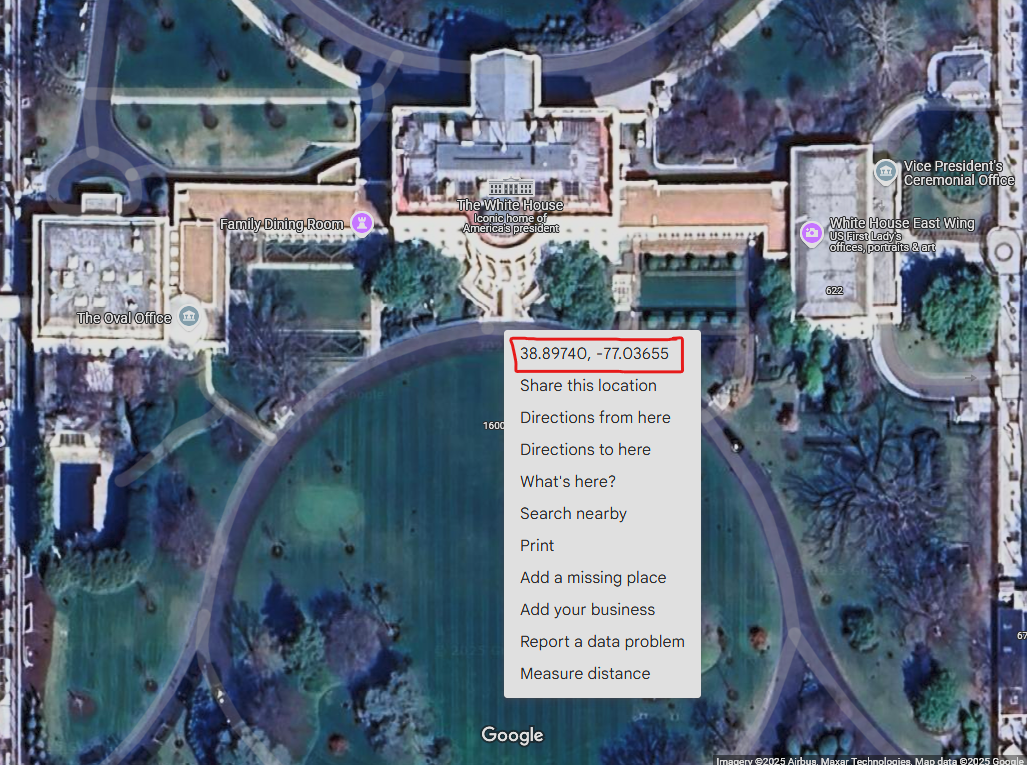
Pro Tip: You can easily get decimal coordinates from Google Maps by right clicking a location and clicking the numbers coordinates. Example:
Commands
-
/getlocation: Translates Minecraft Coordinates to real life coordinates using the scale and tiles. Also generates a Google Maps link to view the location you are at in your browser if you havemapsLinkenabled. -
/coordinate <latitude> <longitude>: Requires the use of decimal coordinates. After you enter the latitude and longitude, it will generate the coordinates in Minecraft. If you have permission tocoordinate.teleportit will generate a teleport command you can click to go there. -
/coordinatorPrimary root command for the plugin -
/coordinator set scale <number>- Allows you to easily set scale from within the game, this will save to the configuration file. -
/coordinator set tiles <number>- Allows you to easily set tiles from within the game, this will also save to the configuration file.
Calculations:
The java code that makes this run:
- Minecraft to Coordinate:
lat = -1 * ((z / scale) * tiles);
lng = (x / scale) * tiles;
- Coordinate to Minecraft:
x = (int) Math.round(lng * scale / tiles);
z = (int) (-1 * Math.round(lat * scale / tiles));